
Sheru Bhai Wallpaper: How to Make HD 4K Lion Boss Wallpapers with AI
Make your own HD and 4K Sheru Bhai wallpapers for phone, WhatsApp DP and status: best sizes, 15 scene ideas, prompt tips, looks and how to keep them sharp.
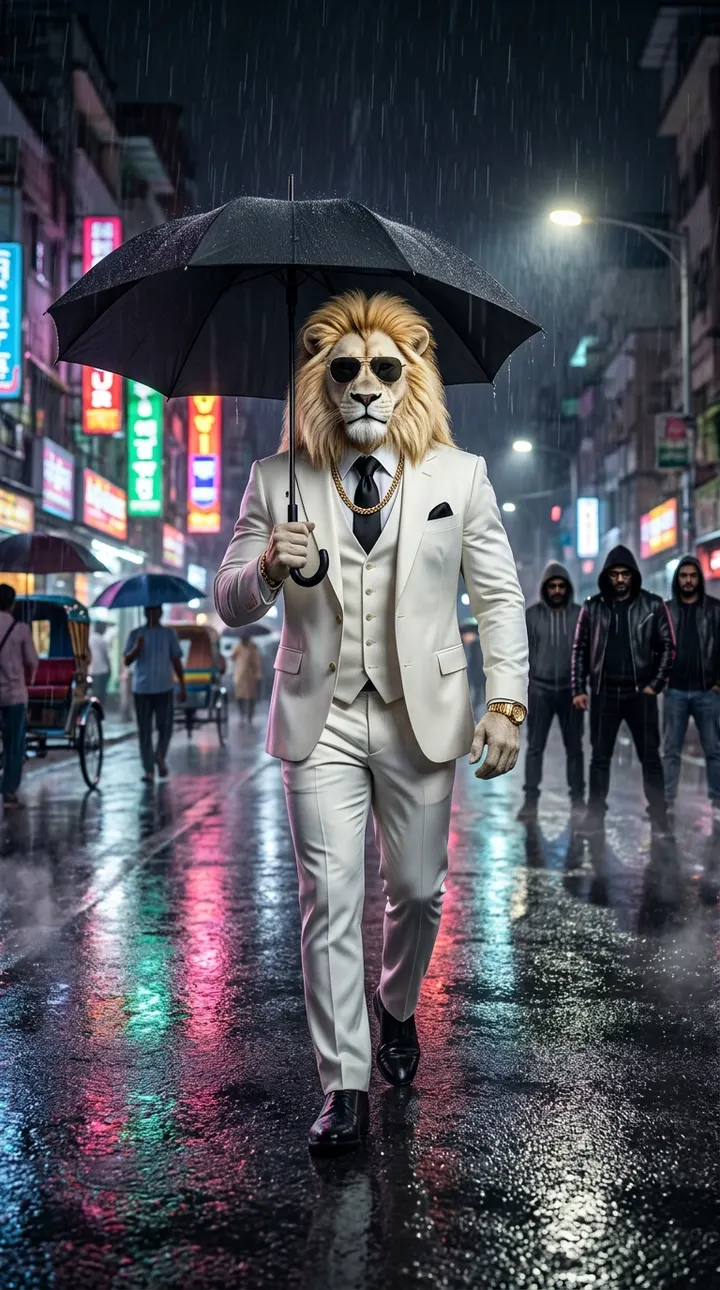
People who love the Sheru Bhai trend want him on their lock screen too. Instead of downloading a blurry screenshot from someone else's Reel, you can make your own Sheru Bhai wallpaper in HD or 4K in under a minute. This guide covers the right sizes, the best scenes, prompt tips and how to keep the image sharp on any phone.
Why make your own wallpaper
- Sharper: screenshots of videos are compressed and usually below 1080p. A generated image can be 2K or 4K.
- Unique: nobody else has exactly your wallpaper.
- No watermark or cropped captions: you get the clean image.
- Fair: you are not reusing another creator's frame.
The right size
Phone screens are tall. Choose these settings in Sheru Bhai AI Photo:
| Use | Aspect ratio | Quality | | ---------------------------- | ------------ | -------- | | Phone lock/home screen | 9:16 | 2K or 4K | | WhatsApp status, Reels cover | 9:16 | 1K or 2K | | WhatsApp/Instagram DP | 1:1 | 1K | | Laptop/desktop | 16:9 | 2K or 4K | | Tablet | 3:4 | 2K |
The Nano Banana 2 model in our studio supports 1K, 2K and 4K. Higher quality costs a few more credits (from 10 credits at 1K to 24 at 4K per image), and the exact cost is shown on the Generate button.
15 wallpaper ideas
Each of these comes from one of our Sheru Bhai scene templates. Pick the scene, switch the mode to AI Photo, and generate.
- Gold throne in a chandelier-lit palace hall. Classic "king" wallpaper.
- Rolls-Royce entry at golden hour.
- Helipad at dusk with city lights below.
- Monsoon walk under a black umbrella on a neon street (great for dark mode).
- Private jet window with sunset clouds.
- Street chai next to a gold Lamborghini.
- SUV convoy at night, headlights blazing.
- 4 AM gym, black tank top and gold chain, skyline behind.
- Royal Maharaja portrait in an ivory sherwani and turban.
- Baraat entry on a white horse with fireworks.
- Chintu selfie in the penthouse.
- Auction paddle raised in a VIP room.
- College gang walking through the gate with the tiger crew.
- Golden lion don portrait on a black background (minimal).
- 3D cartoon Sheru for a fun, family-friendly lock screen.
Prompt tips for wallpapers
The templates already include the character lock and a photoreal style, but wallpapers have extra needs:
- Leave space for the clock. Add "empty sky in the upper third" or "dark background at the top" so the time and notifications do not cover his face.
- Centre the subject. Add "centered composition" for phones that crop the edges.
- Use darker scenes for dark mode. Night, rain and black backgrounds save battery on OLED screens and look premium.
- Ask for a portrait. For a DP, add "close-up portrait from the chest up".
- Keep "no text, no watermark". Text in AI images is usually garbled.
Example addition to the throne scene:
…centered composition, empty dark ceiling in the upper third for the clock, ultra detailed, 9:16, no text, no watermark.
Pick a look
Our studio has four Sheru Bhai looks. For wallpapers:
- White lion boss: the iconic version, best in bright scenes (palace, golden hour).
- Golden lion don: black velvet suit, best in night scenes and minimal backgrounds.
- Royal Maharaja: sherwani and turban, perfect for festive and wedding themes.
- 3D cartoon: cute but cool, good for kids' tablets and family phones.
Generate four, keep one
Set the image count to 4 and generate several variations in one go. Pick the best, then regenerate that idea at 4K if you started at 1K. If one variation has a strange paw or extra fingers, it is faster to choose another than to fix it.
Keep it sharp on your phone
- Download the original JPG from My Creations, not a screenshot.
- On Android and iPhone, set the image as wallpaper with "fit" or "perspective off" to avoid extra zoom.
- If you plan to crop, generate at 2K or 4K first.
Make the wallpaper move
Any wallpaper you like can become a short video: click Animate it on the result to open Photo to Video, choose a slow motion like a stare or a gentle camera push, and you have a live wallpaper or a Reel from the same image.
Using Sheru Bhai wallpapers responsibly
Wallpapers you generate are AI-made and fictional. You can share them with friends and on social media. Do not add real people's faces without consent, and if you sell prints or merchandise, read our Terms and Content & IP Policy first.
FAQ
What is the best resolution for a Sheru Bhai phone wallpaper? 9:16 at 2K is sharp on almost every phone; choose 4K for very large or high-density screens.
Is it free? New accounts get 80 free credits, enough for several 1K wallpapers.
Can I make a WhatsApp DP? Yes: choose 1:1 and add "close-up portrait" to the prompt.